

An electrician client questionnaire is a structured intake form that captures project scope, contact details, and budget signals before you invest time in a site visit or quote. Done right, it filters out bad-fit leads, gives you the context to price accurately, and sets professional expectations from the first interaction. Most electricians skip this step or rely on a phone call that goes nowhere. The two-stage, routing-first approach changes that. Tools like Google Forms and Doc2Form make it easy to build a form that works on any phone and feeds directly into your workflow.
What should you include in an electrician client questionnaire?
A client intake form for electricians needs to do two things fast: confirm the job is in your service area and scope, then collect enough detail to prepare for a real conversation. Think of it as a conversation starter, not a test. Contractor questionnaires work best when they feel approachable rather than bureaucratic.
Routing fields to capture first:
- Full name, phone number, and email address
- Service zip code or city
- Type of service needed (residential, commercial, new installation, repair, inspection)
- One-line problem summary ("panel upgrade," "no power to kitchen," "EV charger install")
Project qualification fields for follow-up:
- Property type and ownership status
- Estimated project timeline and budget range
- Access requirements or site restrictions
- Existing electrical panel age and amperage (if known)
- Preferred contact method and availability
A comprehensive prequalification questionnaire covers six core sections: company or client details, financial and insurance standing, technical competence, safety records, environmental policies, and references. That level of depth is appropriate for commercial bids. For residential leads, trim it down to the essentials and save the deep dive for the follow-up call.
Pro Tip: Add a single budget range field with preset options like "Under $500," "$500–$2,000," and "Over $2,000." Clients who skip it are often the ones who will argue your invoice later.

How should you structure your questionnaire for better completion?
The biggest mistake electricians make is front-loading their form with too many questions. Clients abandon long forms before they finish. The fix is a two-stage form approach: a fast-start form for routing, followed by a detailed scope questionnaire after initial interest is confirmed.
Here is how to build that structure:
- Stage 1 — Fast-start form: Name, phone, zip code, service type, and a one-line description. Keep it under five fields. The goal is to capture the lead, not qualify them completely.
- Stage 2 — Scope questionnaire: Sent by text or email after Stage 1 is submitted. This is where you ask about panel specs, access, timeline, and budget. Clients are already engaged, so completion rates are higher.
- Mobile optimization: Most clients fill out forms on their phones. Use large tap targets, dropdown menus instead of text fields where possible, and avoid file upload requirements at this stage.
- Confirmation message: After Stage 1 submission, show a message that sets expectations. "We'll review your request and follow up within 2 hours" reduces no-shows and builds trust immediately.
Reducing initial form fields increases completion rates by cutting friction during the mobile fast-start stage. That single change can recover leads you were losing without knowing it.
| Form Type | Best Use Case | Completion Rate Impact |
|---|---|---|
| Fast-start (3–5 fields) | Initial lead capture | High — low friction |
| Full scope questionnaire | Pre-quote detail gathering | Medium — sent after opt-in |
| Post-service feedback form | Review and satisfaction data | High — short and structured |
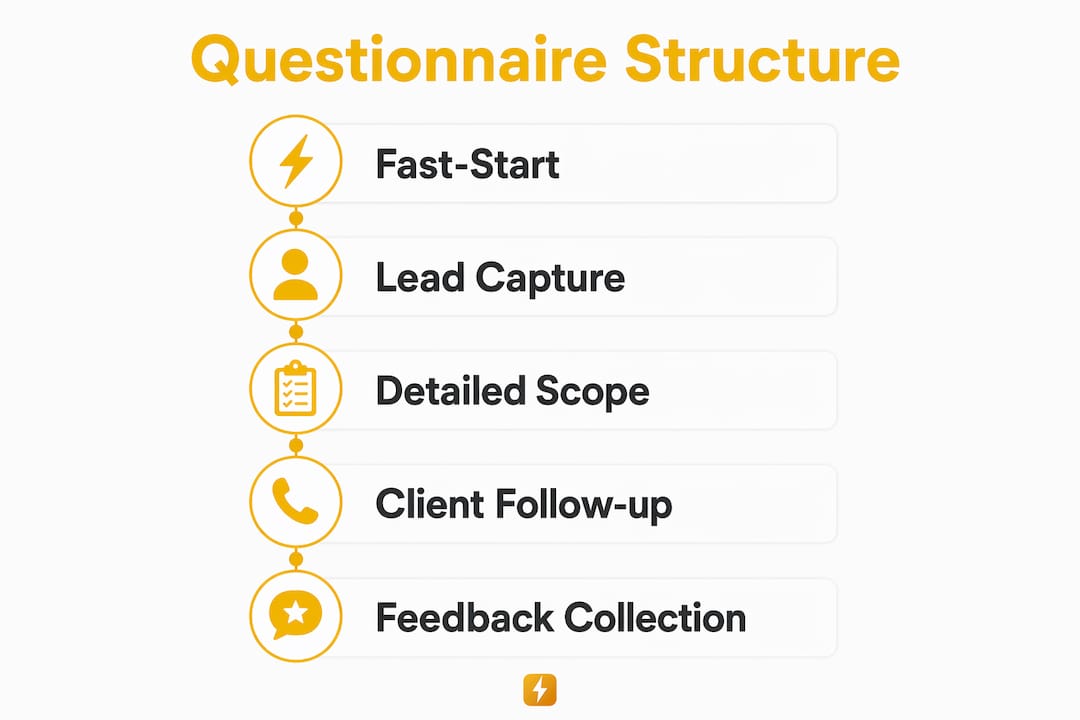
Pro Tip: Never ask for a detailed project scope brief in Stage 1. An intake form should confirm service fit and collect enough to prepare for the first call. Save the scope questions for Stage 2.
How do you collect client feedback after the job?
Post-service feedback is where most electricians leave money on the table. A short electrician client feedback form sent right after job completion builds your online reputation and surfaces problems before they become one-star reviews.
The key is structure. Post-service feedback forms work best when 80–90% of questions use rating scales. Open-ended prompts slow clients down and drop your response rate. A well-structured rating system lets clients complete the survey in under 60 seconds.
- Ask clients to rate communication, punctuality, workmanship, and cleanup on a 1–5 scale
- Add one optional open-ended field: "Anything else you'd like us to know?"
- Do not ask for a star rating explicitly. Instead, request honest reviews framed as "helping other homeowners find trustworthy electricians in your area"
Timing matters more than most contractors realize. In-person review requests made during the job close-out are the most effective. Train your technicians to send a direct Google review link on the spot, not two days later via an automated email. Immediate, personal asks outperform delayed automation every time.
"The best time to ask for a review is when the client is standing in their kitchen, lights working, happy. That moment is worth more than any follow-up sequence."
QR codes printed on your invoice or truck door make this frictionless. The client scans, lands on your Google review page, and you get the feedback while the experience is still fresh.
Which tools help you build and manage electrician questionnaires?
Google Forms is the most accessible starting point for most electricians. It is free, mobile-friendly, and creates an automatic spreadsheet of every submission. That spreadsheet becomes your audit trail for insurance documentation and warranty records.
Doc2Form converts existing PDF or Word intake scripts into digital forms, preserving your proprietary terminology and standard operating procedures. That matters for compliance. Digitizing intake scripts prevents the margin of error that comes from freestyle phone intakes and keeps your brand language consistent across every technician on your team.
| Tool | Best For | Key Advantage |
|---|---|---|
| Google Forms | Fast setup, mobile-friendly intake | Free, audit-ready spreadsheet output |
| Doc2Form | Converting existing SOPs to digital forms | Preserves terminology, reduces errors |
| Snapqualify | Lead qualification and risk scoring | AI-powered SnapScore for client vetting |
| QR code generators | On-site feedback and review requests | Instant access, no app required |
For electricians who want to go beyond basic data collection, Snapqualify builds risk analysis directly into the intake process. Clients answer questions about scope, budget, and project history. The platform then generates a color-coded SnapScore that signals whether the lead is worth pursuing. You can read more about contractor intake form options to decide which tool fits your current workflow.
Key takeaways
A well-designed electrician client questionnaire qualifies leads faster, reduces wasted site visits, and sets the foundation for accurate quotes and better client relationships.
| Point | Details |
|---|---|
| Use a two-stage form | Capture routing data first, then send a detailed scope form after initial interest. |
| Keep Stage 1 under five fields | Fewer fields mean higher completion rates, especially on mobile devices. |
| Time feedback requests carefully | Ask for reviews in person at job close-out, not days later via automation. |
| Digitize your existing scripts | Tools like Doc2Form preserve your SOPs and reduce manual data entry errors. |
| Score leads before committing | Platforms like Snapqualify add risk analysis to your intake process automatically. |
What i've learned after years of watching contractors get this wrong
Most electricians I talk to treat their intake process as an afterthought. They take a call, jot down a name and address, and show up hoping for the best. Then they wonder why they're chasing checks or dealing with scope creep on jobs they never should have taken.
The contractors who run tight businesses do one thing differently: they qualify before they commit. A good questionnaire for electrical services is not about paperwork. It is about signals. The client who skips the budget field, gives a vague problem description, and wants you on-site tomorrow is sending you signals. The form just makes those signals visible before you've burned half a day.
I've also seen electricians overcorrect. They build a 20-question intake form that reads like a legal deposition. Clients bail halfway through, and the contractor blames the tool. The form is not the problem. The design is. Short, staged, and mobile-first wins every time.
One more thing: train your technicians to close out jobs with a review ask. Not an email three days later. In person, with a direct link. That single habit, done consistently, builds a Google profile that generates leads on its own. The lead qualification checklist and the review process are two sides of the same coin. Get both right and your business runs cleaner.
— Colin
How Snapqualify helps you qualify electrical clients faster
Snapqualify is built for trade contractors who are tired of wasting time on bad-fit leads. You send clients a branded intake form, they answer questions about project scope, budget, and timeline, and Snapqualify's AI generates a color-coded SnapScore in minutes.
The platform uses your existing templates, so you are not starting from scratch. Forms are mobile-first, which means higher completion rates from clients filling out your questionnaire on their phones. Client data is protected with enterprise-grade security that meets compliance standards for sensitive project and financial information. If you want to build an intake form that works from day one, Snapqualify gives you the structure and the scoring to make confident decisions before you ever pick up the phone.
FAQ
What is an electrician client questionnaire?
An electrician client questionnaire is a structured intake form that collects contact details, project scope, and budget information from potential clients before a quote or site visit. It helps electricians qualify leads and prepare accurate estimates faster.
How many questions should an electrician intake form have?
A fast-start intake form should have no more than five fields to maximize completion rates. A follow-up scope questionnaire can include 10–15 targeted questions sent after initial contact is confirmed.
What questions should i ask before giving an electrical quote?
Ask about property type, panel age and amperage, project timeline, budget range, and any access restrictions. These questions before a quote give you enough context to price accurately without requiring a site visit first.
How do i get more reviews from electrical clients?
Request reviews in person at job close-out and send a direct Google review link immediately. Honest review requests framed around helping other homeowners find trustworthy contractors consistently outperform automated follow-up emails.
What tools can i use to create an electrician client questionnaire?
Google Forms works well for basic mobile-friendly intake. Doc2Form converts existing Word or PDF scripts into digital forms. Snapqualify adds AI-powered lead scoring on top of standard intake collection.